
 College ruled, wide ruled, graph, Cornell note, dot, penmanship, columnar, and legal paper. Do you have all these available for your students? Do you even know what half of these are used for? More than likely you don't have these and don't know what half of these are used for. But lets say you need your students to use Cornell note styled paper and your school supply closet doesn't have it. Well guess what, printablepaper.net is to your rescue! Printable Paper has hundreds of papers you can download and print for free. They have graph paper, lined paper, financial paper, music paper, and more. Printable Paper has been featured by LifeHacker, and many other "helpful" sites across the web.
Sunday, October 19, 2008
Printable Paper
College ruled, wide ruled, graph, Cornell note, dot, penmanship, columnar, and legal paper. Do you have all these available for your students? Do you even know what half of these are used for? More than likely you don't have these and don't know what half of these are used for. But lets say you need your students to use Cornell note styled paper and your school supply closet doesn't have it. Well guess what, printablepaper.net is to your rescue! Printable Paper has hundreds of papers you can download and print for free. They have graph paper, lined paper, financial paper, music paper, and more. Printable Paper has been featured by LifeHacker, and many other "helpful" sites across the web.

Tube Leecher
 Have you ever gone on YouTube and was like...I wish I could show this in my classroom, but those 'darn' internet filters will block it! Then you think, I wish I could download that file, and you search high and low to see if you can the video from YouTube. Afters hours of searching, well hopefully you give up at 5 minutes, you come to the conclusion that it's not possible. But suddenly a great site is found, Tube Leecher!
Tube Leecher lets you plug in the standard http link to the YouTube video and lets you download it directly to your computer. So, you still need to be able to go to YouTube, but not you can download the file at home, and birng it to school. Now the only catch is that you need to download and install flvplayer flash player to open the videos. But you can always convert them so you can play with windows media player. Now I'm not saying this is 100% legal, but if it's public, it's for everyone right?
eCalc - Online Scientific Calculator
 Oh the beauty of high school math and the love of the TI83 calculator. But do you have an extra $130 laying around to dish out for it? Well we all know it's nice to have in class, but what about transporting it from school to home and back? eCalc has came out with their own version of the TI83, but hey guess what....it's FREE! (hey that rhymed!) eCalc is a free online calculator that supports many advanced features including unit conversion, equation solving, and even complex-number math. The calculator is designed to work directly in your browser and requires no special plug-ins.
You can even download this thing so you have it directly on your home desktop, well that's if you're running Windows that is. And...get this...hold on to your chair...they have recently came out with a version that goes right on to your flash drive. eCalc compiled eCalc basic calculator into a standalone .exe which allows you to run the calculator from a flash thumb drive, or right from your desktop without requiring any installation. Download Portable Calculator (Standalone exe version) So go crazy and plug and chug those numbers in.
Dynamic Periodic Table
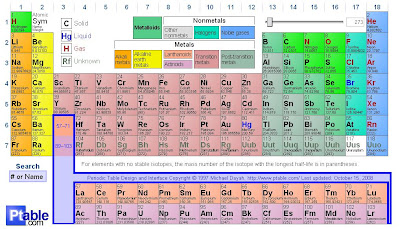 My background is not in chemistry, I don't teach it, only took it high school, and to me, it's pretty confusing! But if I was teaching chemistry....hmmm the dream...just kidding, no way Jose...I found a site that has the best darn periodic table known to man, well at least known to me. It's called the Dynamic Periodic Table, and it's a fully interactive periodic table online. It's so interactive, I'm amazed every click. If you want to find out a particular element, click on it, and it gives you all the information in the world about it. It also breaks it down by column or row. So lets say you click on the first column, it breaks it down as the Alkali metal group, breaks down each one. Just like that, BAM you're on your way to becoming a chemist! The Dynamic Periodic Table even lets you turn on and off the names and weights, so if you have to test yourself, it's as simple as a click!
Monday, October 13, 2008
Natural Motion Endorphin
 We all know that today's students don't go home, do their homework, practice the piano, help with dinner, clean up, and go to bed. It's more like come home, flip on the Xbox 360, Wii, or PS3 and PWN people online in games. What is there learning going on in those games? I say 100% YES! I myself is a avid video game player, and trust me, you learn a lot in, it might not be on the ACT, but you do learn.
 When trying to look for software to try to get my students involved with animation, I found a company called NaturalMotion who created a software called Endorphin. Endorphin is a software that is the industry's first Dynamic Motion Synthesis software. At the heart of endorphin are its Adaptive Behaviors, which - unlike animation data - are completely interactive. With Adaptive Behaviors, 3D characters essentially animate themselves. Move two Football players close to each other and one will automatically tackle the other one, realistically trying to grab hold of his legs and bringing him down . Or not. It really is up to you. endorphin allows animators to direct scenes in real-time in a way they have never been able to do before. You can change parameters or change behaviors and see the results instantly on the screen in front of you. When you're done, export animation data in one of the many formats, ready for use in your game or VFX shot.
The best part Endorphin is that it is FREE for education, and all you have to do is download the software and register it. So go ahead and download it, heck it even comes with free video tutorials on how to make it work! This software is one of a kind, and it's completely free for the education version! How cool is that!
Sunday, October 12, 2008
20Q
 Do you ever want to amaze you class? Well you probably already do, (or like to think you do by teaching them everyday.) But what about good old fashion, jaw-droppin' amazement. I picked a 20Q few years back after one of my professors in college showed it to me. I had to get one, I was hooked, then all my roommates where too. Now, they have all sorts if different 20Q's now that you can purchase. But they also have a FREE version online. Which I think is great!
Go ahead, and see if you can beat it. It's amazing, I just tried it, and it picked the breed of my dog! All in 20 Questions! (hence the name 20Q). Enjoy...and amaze yourself and your students! Oh and just a FYI - 20Q was 2004's Toy of the Year!
Phun - A 2D physics sandbox!
 I know I'm always looking into ways to get my students more involved in learning. The best thing I've found is that students learn the most, when they're having fun! As classes get harder, I've found it's harder to engage students in fun ways...but then I came across a website called Phun.
Phun is a free game like 2D physics sandbox where you can play with physics like never before. The playful synergy of science and art is novel, and makes Phun as educational as it is entertaining. Click below to download PHUN for PHREE!

And if you're not already excited about Phun, just watch this short video!
The eyeballing game

The game works by showing you a series of geometries that need to be adjusted a little bit to make them right. A square highlights the point that needs to be moved or adjusted. Use the mouse to drag the blue square or arrowhead where you feel it is 'right'. Once you let go of the mouse, the computer evaluates your move, so don't let up on the mouse button until you are sure. The 'correct' geometry is also shown in green. To avoid the need for extra mouse clicks, a mouse button up counts as the move being finished, so be careful.
So go ahead and try it...I dare you! And as a warning, it's addicting.
Saturday, August 30, 2008
Floorplanner.com Beta
 Looking for a way to rearrange your room, without moving all the desks just to realize that you like what you had the first time? Not everyone was born to be an interior designer, architect, or I guess you can say a classroom specialist. What I'm trying to get to is that floorplanner.com is a free website (that is currently in it's beta stage) that lets you design your room and set it up different ways BEFORE you move everything. Now I'm not saying that thing is 100% fool proof, but it is saving you time, and a big headache.
Floorplanner says it is the easiest, quickest, and best looking way to create and share interactive floorplans. Using point-and-click, drag-and-drop tools, you can make your floor plan in minutes, and rearrange it as often as you want. Then you can save, send, and print your designs to share them, or place them on your own website. So go ahead and be crazy! Hey even incorporate this into your classroom somehow...it's easy for me, I'm a drafting teacher.
Monday, August 25, 2008
ididwork.com
 So if you're like me, you want to know what your students are doing each day. Especially in a situation like myself, where I'm in a computer lab with 28 computers, and a list of assignments due throughout each week. Anyways...the best thing I have found to use to keep students on their toes is a website called ididwork.com. It's a free way for your students to keep a log on what they accomplish each week. It also allows them to email you their daily, weekly, monthly, etc. etc. production. So this can be used on projects, everyday worksheets, and pretty much anything else you could give out. It also has an option of getting in contact with other peers and see what kind of work they are doing, so say you're doing a group project, instead of the awkward phone call to see what Johnny is doing, just go on to ididwork and check out his progress, then give him that attitude because he waited last minute to finish the project!
Monday, August 4, 2008
Fantastic Contraption
 We all know that Physics is a pretty hard class, and the number of students in high school that actually take it, and well, understand it, is even a smaller number. Well developer Colin Northway has created a free online game called Fantastic Contraption. It's a fun Physics based puzzle game. The main object of the game is to create your machine in a given area and push your pink wheel into the pink box. Each level has basic parts you can build with. Each level gets harder and harder, with a total of 20 free levels to play from. If you like the game so much, you can put up $10 and get the full game, which then allows you save games and build levels. I'd much rather have kids go online and play this game rather than find proxy servers and try to get on their mySpace.
Thursday, July 31, 2008
Task2Gather.com
 It's all about timing...right? That's what you tell your students, you remind them, you have 2 weeks left until your project is due, 1 week, 3 days, tomorrow! And you're guessing about 75% of your students wait until that last week or so to start. Well Task2Gather is a great way to keep kids on track! Task2Gather is a free service for online task and project management. Manage all your tasks and projects online with Task2Gather and invite your student's parents, teachers, students, and anybody else to participate in the project. So now Johnny's parents can't say, "We never knew about this project!" Hello McFly! It's been assigned for over 2 weeks! Once again this is all free, you just need a email address!
Subscribe to:
Posts (Atom)


